
 Muhammad Naeem
For home and small-office printing in Pakistan, the real contest is Epson EcoTank against Canon PIXMA G, and the entry prices are nearly identical: the Canon PIXMA G2020 starts at Rs 47,250 and the Epson EcoTank L3250 at Rs 48,000, with the WiFi models from both brands at Rs 52,500. So the decision comes down to running cost, print quality and habits, not the sticker. This comparison uses the prices from our four checked model pages.
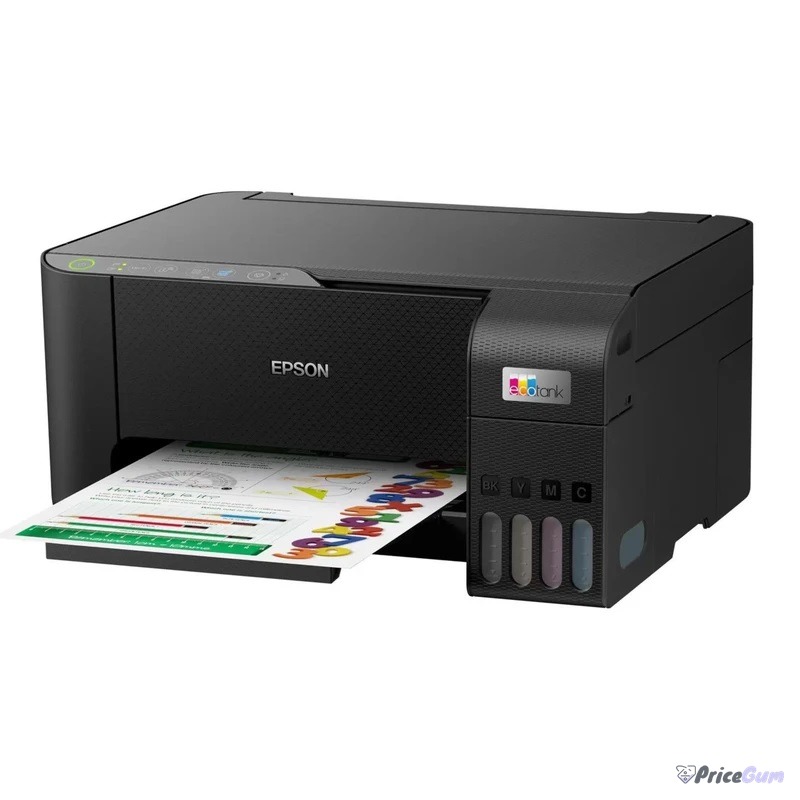
Epson EcoTank vs Canon PIXMA G prices in Pakistan
| Model | Price (Rs) | Notes |
| Canon PIXMA G2020 | 47,250 to 51,900 | Cheapest entry point, USB model |
| Epson EcoTank L3250 | 48,000 (range 46,499 to 53,500) | WiFi included, most popular home pick |
| Epson EcoTank L3256 | 52,500 | WiFi model, white finish |
| Canon PIXMA G3020 | 52,500 (range 44,500 to 52,500) | WiFi model, matches Epson on price |
Each model has a full page on this site: the Epson EcoTank L3250 and Epson EcoTank L3256 on one side, the Canon PIXMA G2020 and Canon PIXMA G3020 on the other. If your work is text-only and high volume, also look at the mono laser HP LaserJet M111a before deciding.
Head to head: what actually differs
| Factor | Epson EcoTank (L3250 class) | Canon PIXMA G (G2020 class) |
| Entry price | Rs 48,000 | Rs 47,250 |
| WiFi model price | Rs 52,500 (L3256) | Rs 52,500 (G3020) |
| Print head | Fixed PrecisionCore, service replaced | User-replaceable heads |
| Ink system | EcoTank bottles, high page yield | GI-series bottles, high page yield |
| Better at | Photos, colour documents, low power use | Fast sharp documents, easy head swaps |
Which one should you buy?
Buy Epson if you print photos and colour documents often, want the slightly cheaper entry into WiFi printing, and prefer the huge EcoTank service network across Pakistani cities. Buy Canon if your work is document-heavy, you want replaceable print heads you can swap yourself when they eventually wear, and you like the G series’ document speed. For a home that prints a few pages a week, either brand serves well; pick by the WiFi model price on the day you buy, and budget for one extra set of ink bottles in the first year.
Running costs and upkeep, honestly
Both systems print for a small fraction of what cartridge printers cost per page, because a bottle set yields thousands of pages instead of a few hundred. The costs that surprise owners are not ink but neglect: any tank printer left idle for a month can clog, and cleaning cycles waste ink to clear it. Print one colour test page every week or two, keep the printer away from dusty fans, and use genuine or good-quality compatible ink; the cheapest unbranded bottles are how print heads die early. Canon’s replaceable heads soften that risk on the G series, while Epson counters with a service centre in practically every major city, so a serious clog is a repair trip rather than a write-off either way.
Who should skip both and buy laser
If your printing is school assignments, invoices and documents only, and it comes in bursts of fifty pages at a time, neither tank printer is the fastest tool. A mono laser starts instantly, prints far quicker per page, and never clogs in the holidays. That is why our model pages include the HP LaserJet M111a as the laser benchmark at this budget. Choose tank for colour, photos and steady weekly printing; choose laser for text-only speed and long idle gaps.
Matching the model to your monthly volume
Under about 100 pages a month, the cheapest entry model on either side is enough, and the decision reduces to whichever is in stock at the better price that week. Between 100 and 500 pages, the WiFi models earn their premium because phones and laptops all print without cables, and both brands price that step at the same Rs 52,500. Above that, look honestly at duty cycle and first-page speed rather than brand: a small office printing contracts all day will outgrow any home tank printer, and that is where a workgroup laser starts paying for itself. Most Pakistani homes and home offices sit in the middle band, which is why the L3250 and G3020 class is where both companies fight hardest.
Brand strengths
- Cheaper WiFi entry in practice (L3256 widely stocked at Rs 52,500)
- Strong photo and colour document output for the price
- Largest service and parts network of the two in Pakistan
- Heat-free print head design is gentle on power consumption
- User-replaceable print heads extend the printer’s working life
- Sharp, fast document printing for office workloads
- G2020 undercuts Epson slightly at Rs 47,250 as the entry point
- Simple front-facing tanks make ink levels easy to check
Frequently asked questions
Which is cheaper to run, EcoTank or PIXMA G?
Both use bottled ink with yields in the thousands of pages per set, so running costs are close. The difference over a year is small next to the price of paper; buy genuine bottles from either brand to protect the heads.
Which prints better photos?
Epson’s L3250 series is the safer pick for photo colour and borderless prints at this price. Canon counters with strong document sharpness and user-replaceable heads.
What does WiFi cost on each side?
Both brands land at Rs 52,500 for the WiFi models we checked (Epson L3256, Canon G3020). The non-WiFi starters cost Rs 47,250 to 48,000.
Tank printer or laser for an office?
For colour and photos, tank. For fast text-only volume, a mono laser like the HP M111a prints quicker and never clogs, at the cost of toner.
Bottom line: there is no runaway winner here, and that is good news for buyers. The Canon G2020 opens the bidding at Rs 47,250, the Epson L3250 answers at Rs 48,000, and both WiFi models land at Rs 52,500, so you can choose on print quality, head design and service reach instead of price panic. Whichever badge you pick, print something every week, keep the receipt, and a tank printer will quietly be the cheapest printer your home or office has ever owned.
Prices checked 1 October 2026 from the model pages linked above. Printer prices vary by city and stock, so confirm the exact model and warranty before ordering.


Add comment