
 Muhammad Naeem
Short answer: your motherboard decides for you. DDR4 and DDR5 use different slots and cannot be swapped, so the real question is whether your next build should stay on DDR4 to save money or move to DDR5 for a longer upgrade path. In Pakistan right now, DDR4 starts at Rs 6,000 for 8GB while DDR5 builds effectively start at Rs 19,500 for 16GB. This guide compares real prices from our checked listings so you can spend on the right standard.
DDR4 vs DDR5 prices in Pakistan
| Capacity and standard | Price in Pakistan (Rs) | Availability note |
| 8GB DDR4 | 6,000 to 6,700 | Widely available |
| 32GB DDR4 kit | 19,300 to 30,450 (most near 21,500 to 25,600) | Widely available |
| 8GB DDR5 | 21,499 and up | Barely stocked locally; most builders start at 16GB |
| 16GB DDR5 | 19,500 to 21,500 entry | Available |
| 32GB DDR5 kit | 37,000 to 66,990 | Available |
Every figure above comes from our dedicated capacity pages: the 8GB DDR4 and 32GB DDR4 ladders on the DDR4 side, and the 8GB DDR5, 16GB DDR5 and 32GB DDR5 pages on the DDR5 side.
The physical difference comes first
| Difference | DDR4 | DDR5 |
| Typical speeds | 2666 to 3600 MT/s | 4800 to 6400 MT/s and above |
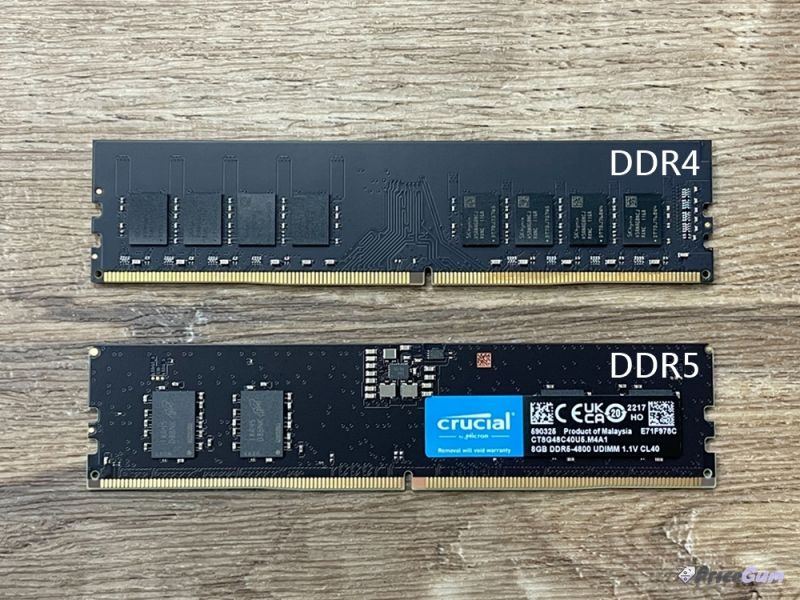
| Notch position | Further left on the contact edge | Closer to centre (see photo) |
| Voltage | 1.2V | 1.1V, regulated on the stick itself |
| Platforms | AMD AM4, Intel DDR4 boards | AMD AM5, Intel DDR5 boards |
| Starting price in Pakistan | Rs 6,000 for 8GB | Rs 19,500 for 16GB (8GB barely stocked) |
Look at the photo at the top of this page: the notch in the gold contacts sits in a different position on each stick. That is deliberate. A DDR5 stick physically cannot seat in a DDR4 slot, so there is no adapter and no workaround. Check your motherboard model before ordering anything.
Which one should you buy?
Stay on DDR4 if your current motherboard supports it. An upgrade from 8GB to 16GB or 32GB of DDR4 is the cheapest meaningful speed-up for an older gaming or office PC, and the money saved can go to an SSD or GPU where it shows more. Move to DDR5 only when you are building on AMD AM5 or a recent Intel platform, or when you plan to keep the machine for five years or more and want the newer standard’s headroom. Gamers should know the honest truth: at the same capacity, DDR5 wins by a few percent in most games, not by a margin you can feel.
Capacity beats speed: where the money works harder
One upgrade pattern beats both standards arguments: going from 8GB to 16GB, or from 16GB to 32GB, on the standard you already own. A PC that is paging to disk because it ran out of RAM feels slow no matter which generation is installed, and fixing that costs one stick, not a new platform. Spend on capacity first, on a second matching stick for dual-channel second, and on generation last. The gains from DDR5’s higher speeds show up most in integrated-graphics laptops and memory-sensitive workstation loads, not in the average gaming rig with a dedicated GPU.
A quick word for laptop owners
Laptops use smaller SO-DIMM sticks, and the same notch rule applies: a DDR5 laptop stick will not fit a DDR4 laptop slot. Many thin laptops also ship with RAM soldered to the board, where no upgrade exists at any price. Before ordering anything, check your exact model for “memory slots” in its service manual, then match the standard, speed and voltage of the stick already fitted. Mixing one old and one new stick works, but the pair runs at the slower stick’s settings, so a matched pair is the clean upgrade.
Why DDR5 prices look upside down right now
New buyers notice something odd in the table above: a 16GB DDR5 stick can list near the price of an 8GB one, and sometimes below a premium 8GB listing. That is a stock effect, not a pricing error. 16GB is the size every AM5 and new Intel build buys, so it ships in volume and competes hard; 8GB DDR5 is barely stocked, and the few listings carry scarcity prices. The practical lesson: on DDR5, price the 16GB stick first even if you planned 8GB, and on DDR4 ignore single odd listings and follow the cluster of sellers, the way our 32GB DDR4 page ranges Rs 19,300 to 30,450 with most stock far tighter than the extremes.
Pros and cons
- DDR4 8GB sticks from Rs 6,000 keep older PCs fast for very little money
- DDR5 only makes sense on AM5 or new Intel builds, where it is the required standard
- At 32GB, DDR4 kits (from about Rs 21,500) undercut DDR5 kits (from Rs 37,000) by a wide margin
- The two standards are not interchangeable; the notch position differs and the stick will not fit the wrong slot
- Desktop 8GB DDR5 barely exists in Pakistan, so DDR5 builds start at 16GB and cost more
- DDR5 gaming gains over DDR4 are small at the same capacity for most titles
Frequently asked questions
Can I put DDR5 RAM in a DDR4 motherboard?
No. The notch position and voltage regulation differ, so the stick will not fit or work. The motherboard chipset decides which standard you must buy.
Is DDR5 worth it for gaming in Pakistan?
Only on a new build. For an existing DDR4 PC, spending the same money on capacity (16GB to 32GB) or a faster SSD gives a bigger real-world gain.
Why is 8GB DDR5 so hard to find?
Sellers stock what builders buy, and DDR5 builds start at 16GB. That is why our 8GB DDR5 page shows barely any genuine listings while 16GB kits are widely available.
How much RAM do I actually need?
16GB is the comfortable minimum for gaming and office work in 2026. Choose 32GB if you edit video, run virtual machines or keep many browser tabs open while gaming.
Prices checked 1 October 2026 from the capacity pages linked above. RAM prices move with import rates, so confirm before ordering and always match the stick to your motherboard’s supported standard.


Add comment