
 Muhammad Naeem
The ASUS ROG Strix B650E-F Gaming WiFi is the AM5 motherboard that keeps showing up on Pakistani build lists, and there is a simple reason for that. It sits in the sweet spot between budget B650 boards and the much pricier X670E flagships. You get a PCIe 5.0 graphics slot, a PCIe 5.0 M.2 slot, WiFi 6E, and a proper 12+2 power stage VRM from the ROG Strix line, all on a board that costs noticeably less than the X670E-F. For a Ryzen 7000, 8000, or 9000 series gaming or creator PC, it is one of the most balanced foundations you can buy.
Quick answer: the ASUS ROG Strix B650E-F Gaming WiFi price in Pakistan currently sits between Rs. 87,000 and Rs. 89,999 across local sellers (checked October 2, 2026). The cheapest listing is Mustafa Computers at Rs. 87,000, but it is sold out there. RB Tech and Games lists it at Rs. 89,999, also out of stock. The only seller with it in stock today is JunaidTech at Rs. 88,499. Stock on this board comes and goes, so confirm availability before planning the rest of your build around it.
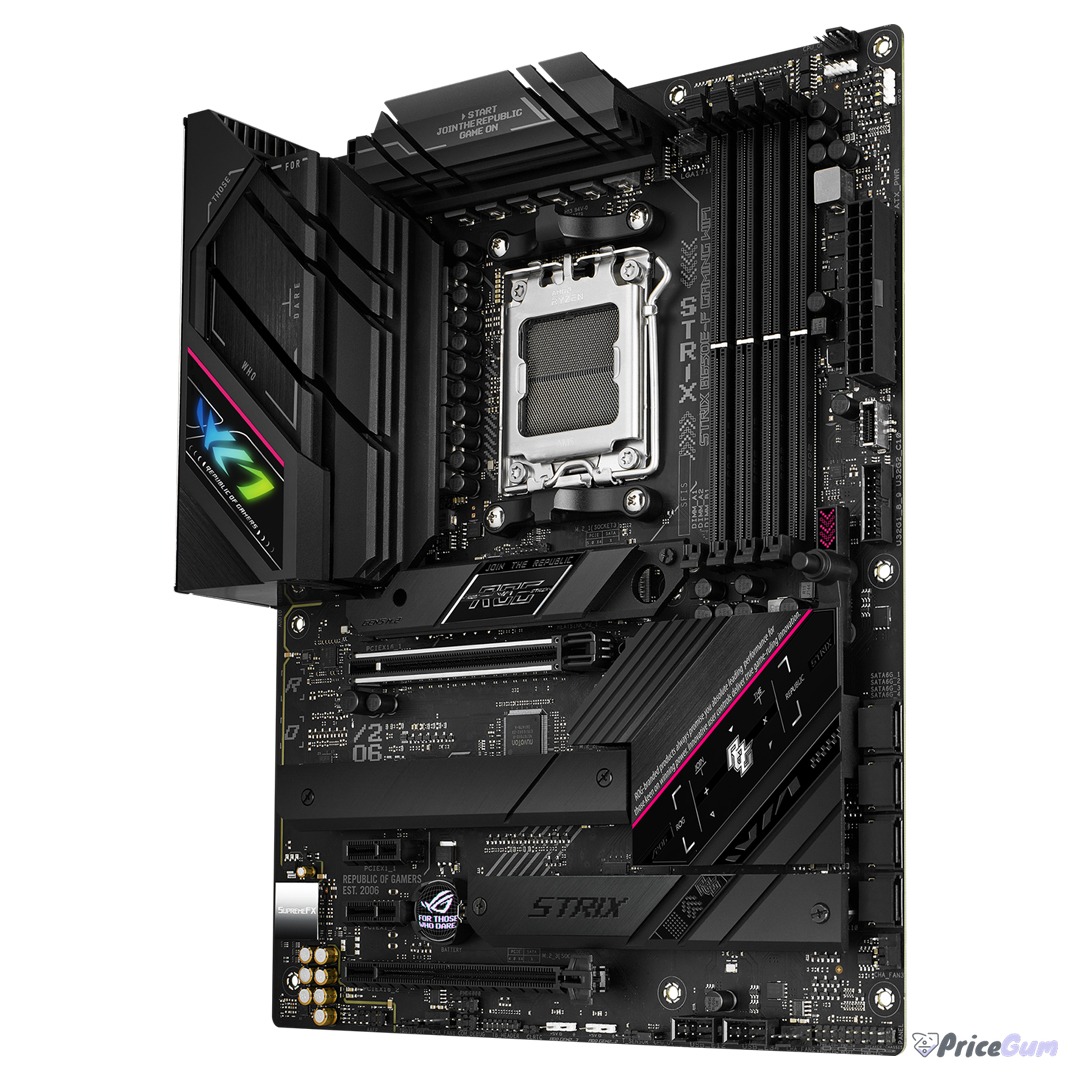
ASUS ROG Strix B650E-F Price in Pakistan
We checked three well known Pakistani PC hardware sellers on October 2, 2026. Prices are listed per seller and never averaged, because what you actually pay depends on who has the board in stock that day. Note that every seller here lists the original ROG Strix B650E-F Gaming WiFi, not the newer B650E-F Gaming WiFi II revision, so check the box and part number when you buy.
| Seller | Price | Status on Oct 2, 2026 |
| JunaidTech (Islamabad) | Rs. 88,499 | In stock |
| Mustafa Computers (Lahore) | Rs. 87,000 | Sold out |
| RB Tech and Games (Lahore) | Rs. 89,999 | Out of stock |
All three sellers quote a one year local warranty, which is what you want on a board at this price. If the seller showing stock runs out, the street price tends to land between Rs. 88,000 and Rs. 90,000, so the JunaidTech price of Rs. 88,499 is a fair reference point for what this board actually sells for in Pakistan.
ROG Strix B650E-F Gaming WiFi Specifications
The “E” in B650E is what matters here. The standard B650 chipset only gives you PCIe 4.0 on the graphics slot, while B650E unlocks PCIe 5.0 for the x16 slot, which puts this board on equal footing with X670E for GPU bandwidth. Here is what you get:
| Feature | Specification |
| Socket | AMD AM5 (LGA 1718) |
| Chipset | AMD B650E |
| Form factor | ATX |
| CPU support | Ryzen 7000, 8000, and 9000 series |
| Memory | 4x DDR5 DIMM, up to 128GB, 6400+ MT/s (OC) |
| Graphics slot | 1x PCIe 5.0 x16 SafeSlot |
| Other slots | 1x PCIe 4.0 x16 (x4 mode), 2x PCIe 4.0 x1 |
| M.2 storage | 1x PCIe 5.0 M.2, 2x PCIe 4.0 M.2, all with heatsinks |
| SATA | 4x SATA 6Gb/s |
| Networking | WiFi 6E, Bluetooth 5.2, 2.5Gb Ethernet |
| USB | USB 3.2 Gen 2×2 Type-C, Gen 2, Gen 1, and USB 2.0 ports |
| Display out | HDMI 2.1, DisplayPort 1.4 (via CPU graphics) |
| Audio | SupremeFX 7.1 HD audio |
| Power design | 12+2 teamed power stages, 8+4 pin ProCool connectors |
| Extras | Aura Sync RGB, AI Noise Cancellation, BIOS FlashBack, Clear CMOS button |
The 12+2 power solution is overbuilt for a mid range board, which is the point. It means a Ryzen 9 7950X or 9900X runs on this board without the VRM breaking a sweat, and the big heatsinks with airflow channels keep temperatures in check under long gaming sessions. The PCIe 5.0 M.2 slot is genuinely useful too, since Gen 5 SSDs are finally showing up at sane prices and this board lets you use one at full speed without giving up GPU bandwidth.
Platform Note: AM5 and DDR5 Only
Buying this board locks you into the AM5 platform, so go in with open eyes. It only takes DDR5 memory, which still costs more than DDR4 in Pakistan, and it needs a Ryzen 7000 series or newer CPU. There is no backwards compatibility with AM4 chips or DDR4 sticks you might already own. The good news is that AM5 is AMD’s long term platform, so a board bought today should still be relevant through future Ryzen generations, and a sensible pairing is something like the Ryzen 5 7600 for a balanced gaming build or a Ryzen 7 or 9 chip if you do heavier work. If you are upgrading from an older AM4 system, budget for the CPU, DDR5 RAM, and the board together, because none of your old core parts carry over.
Board Fit Guide: Case, GPU, and PSU
This is a full ATX board, so it needs a mid tower or full tower case. Do not try to squeeze it into a compact case meant for micro ATX. The PCIe 5.0 x16 slot sits in the usual top position, so a big card like the RTX 4060 or larger fits without the M.2 heatsinks getting in the way, but check your case’s GPU length clearance if you are running a triple fan card. The board takes a 24 pin ATX connector plus 8+4 pin CPU power, so make sure your power supply actually has those CPU connectors and is rated for your graphics card. For cooling, the VRM heatsinks are tall, so very large air coolers can get tight near the top of the board. An AIO liquid cooler or a standard tower cooler avoids the issue entirely. One practical tip: use the top M.2 slot for your fastest SSD since that is the PCIe 5.0 one, and leave its heatsink on. Gen 5 drives run hot without it.
How It Compares
The closest rival in this price range is the MSI B650 Tomahawk WiFi, which is the board most Pakistani builders cross shop against this one. The Tomahawk is usually a bit cheaper and is a fine board, but it is standard B650, so its graphics slot tops out at PCIe 4.0. The Strix B650E-F costs more and in return gives you PCIe 5.0 on both the GPU slot and one M.2 slot, plus the ROG feature set like SupremeFX audio and the beefier heatsink design. Step up to the ROG Strix X670E-F and you pay a large premium mostly for extra connectivity and more USB ports, which most gamers never use. For most people, the B650E-F is the point where extra money stops buying useful performance.
- PCIe 5.0 x16 graphics slot and PCIe 5.0 M.2 slot on a B650 board, a real step up from standard B650
- 12+2 teamed power stages handle even Ryzen 9 chips without thermal drama
- WiFi 6E, Bluetooth 5.2, and 2.5Gb Ethernet cover all modern networking needs
- Costs far less than X670E boards while keeping the features gamers actually use
- ROG extras that matter: BIOS FlashBack, Clear CMOS button, SupremeFX audio, Aura Sync
- DDR5 only, so platform cost is higher than a DDR4 AM4 build
- No USB4 ports, which some competing boards at this price do offer
- Stock in Pakistan is inconsistent, with two of three sellers out of stock at check time
- Full ATX size needs a mid tower case or larger
- Only one PCIe 5.0 M.2 slot, the other two are Gen 4
Frequently Asked Questions
What is the ASUS ROG Strix B650E-F price in Pakistan?
As of October 2, 2026, it lists between Rs. 87,000 and Rs. 89,999 at local sellers. JunaidTech had it in stock at Rs. 88,499, while Mustafa Computers (Rs. 87,000) and RB Tech and Games (Rs. 89,999) were out of stock.
Is the B650E-F different from the B650E-F Gaming WiFi II?
Yes. The WiFi II is a revised version with small changes to connectivity and layout. Pakistani sellers currently list the original B650E-F Gaming WiFi, so check the box and the part number before paying to make sure you get the revision you expect.
Does the ROG Strix B650E-F support Ryzen 9000 series CPUs?
Yes, it supports Ryzen 7000, 8000, and 9000 series processors on the AM5 socket. Very early production boards may need a BIOS update for the newest chips, which is easy thanks to BIOS FlashBack, no CPU needed.
Can I use DDR4 RAM with this motherboard?
No. The B650E-F is DDR5 only. You need DDR5 memory, ideally a 6000 MT/s kit, which is the sweet spot for Ryzen 7000 and 9000 series performance.
Is this board good for a Ryzen 9 7950X or 9900X?
Yes. The 12+2 power stage design and large VRM heatsinks are built for high core count chips, so a Ryzen 9 runs comfortably on this board for gaming, rendering, or streaming workloads.
Bottom line: at around Rs. 88,500 in stock, the ROG Strix B650E-F Gaming WiFi remains the board to beat for an AM5 build in Pakistan. You get PCIe 5.0 where it counts, a VRM that will not limit your CPU choice, and the ROG feature set, without paying the X670E tax. Just confirm stock and the exact revision with the seller before you pay, and make sure your case, PSU, and DDR5 kit are sorted, because this board starts a fresh platform build, not an upgrade.


Add comment