
 Muhammad Naeem
If you need a full terabyte of storage for a desktop PC without paying SSD money, the Toshiba P300 1TB (HDWD110UZSVA) is still one of the cheapest honest options in Pakistan. As of October 2026, the Toshiba P300 1TB price in Pakistan starts at Rs 7,720 at iShopping.pk, where the drive is listed as in stock with delivery available across the country. A second listing on BuyersPK.com advertises Rs 6,490, but it showed zero items in stock at the time of our check, so that is not a price you can actually buy at right now. Expect to pay the iShopping figure unless fresh stock arrives at the cheaper store.
The P300 is Toshiba’s desktop performance line: a 3.5 inch internal hard drive built for everyday desktops, workstations and gaming PCs that need bulk storage for games, media libraries and backups. It spins at 7,200 rpm on a SATA III interface with 64 MB of cache, which puts it in the faster half of mechanical drives, though it is still a spinning disk and nowhere near an SSD for boot times or app launches.
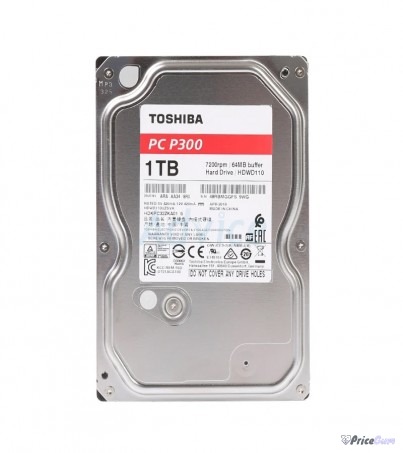
Toshiba P300 1TB Price in Pakistan: Seller Comparison
Here is what Pakistani sellers are asking right now. Hard drive prices move with the dollar and with stock levels, so treat these as verified-today figures and confirm on the store page before you pay.
| Seller | Price (PKR) | Availability | Notes |
| iShopping.pk | Rs 7,720 | In stock | Ships in 1 to 3 days, 7-day free returns, phone and WhatsApp support |
| BuyersPK.com | Rs 6,490 | Out of stock | Listing live but 0 items in stock at last check, Lahore based seller |
Why the Rs 1,230 gap between the two listings? The cheaper BuyersPK figure is that store’s old rate from when they actually had units on the shelf. The iShopping price reflects what importers are charging for fresh stock today. This pattern is common with hard drives in Pakistan: the lowest number on a comparison page is often a ghost listing for something you cannot buy. Until BuyersPK restocks, Rs 7,720 is the real market price, and it is the only one of the two you can act on.
Toshiba P300 1TB Specifications
| Specification | Details |
| Model | Toshiba P300, HDWD110UZSVA |
| Capacity | 1 TB |
| Form factor | 3.5 inch internal desktop drive |
| Interface | SATA III, 6 Gb/s |
| Spindle speed | 7,200 rpm |
| Cache buffer | 64 MB |
| Average seek time | 4.17 ms |
| Sector format | Advanced Format |
| Data protection | Internal shock sensor, ramp loading technology |
| Actuator | Dual-stage actuator |
| Power draw | 6.4 W (read and write) |
| Dimensions | 147 x 101.6 x 26.1 mm |
| Weight | About 411 g (14.5 oz) |
| Warranty | 2 years brand warranty through the seller |
What You Actually Get for the Money
On paper the P300 1TB is a plain 7,200 rpm desktop drive, but Toshiba added a few things that matter in daily use. The dual-stage actuator improves head positioning accuracy, which keeps read and write speeds steady when the drive vibrates inside a case full of fans. The internal shock sensor parks the heads if it detects a knock, and the ramp loading design keeps the slider off the disk surface whenever the drive is idle or being moved. None of this makes a mechanical drive immune to drops, but it does reduce the risk of data loss from the bumps a desktop PC meets in real life.
Sequential speeds land where you would expect for a modern 7,200 rpm platter drive: roughly 150 to 180 MB/s in real-world copies, which is fine for installing and loading games, storing 4K video projects, or running a media library. Where it falls behind is random access. Booting Windows from this drive, launching heavy apps, or working with thousands of small files will feel sluggish next to any SSD. Treat the P300 as a warehouse, not a workshop: bulk storage for things that do not need instant access.
Reliability is the other honest selling point. Toshiba’s P300 line has been around for years with a solid reputation in the budget segment, and the 2-year warranty gives you recourse if a unit arrives dead or fails early. At Rs 7,720 you are paying about Rs 7.7 per gigabyte, which is roughly a third of what budget SATA SSDs cost per gigabyte in Pakistan.
Who Should Buy It, and Who Should Skip It
Buy the Toshiba P300 1TB if any of these describe you. You are adding a second drive to a desktop that already boots from an SSD, and you need somewhere cheap to keep a Steam library or a photo archive. You are building a budget office or home PC where every rupee matters and 1 TB of SSD would blow the budget. You want a dedicated backup or media drive for a home server or an old PC you are keeping alive. Your case has a free 3.5 inch bay and your motherboard has a spare SATA port and power connector.
Skip it if this will be your only drive and you care about how fast the PC feels. In that case, even a small SSD for Windows plus this HDD for storage is a far better setup. Skip it for a laptop: this is a 3.5 inch desktop drive and will not physically fit in any notebook. Skip it if you move your PC between places often, because no mechanical drive likes travel, and skip it if you want a silent build, because a 7,200 rpm drive hums and clicks audibly in a quiet room.
HDD vs SSD: The Honest Comparison
There is no contest on speed. A Gen3 drive like the Samsung 980 1TB reads at over 3,000 MB/s, roughly twenty times what the P300 manages, and boots Windows in seconds. If your budget stretches, pairing a small SSD for the operating system with the P300 for bulk storage is the classic best-of-both build. Our guides to the Samsung 990 PRO 1TB and the WD Black SN850X 1TB cover the faster Gen4 options if you are building a performance rig.
The HDD still wins on two things: price per gigabyte and write endurance for heavy, constant writing. If you are archiving video footage, running a Plex server, or just need the cheapest possible terabyte, the P300 at Rs 7,720 remains hard to beat. Just go in with clear expectations about speed.
Installation and Setup Notes
Installing the P300 takes ten minutes if your case has a 3.5 inch bay. Mount the drive with the included screws, connect a SATA data cable to any free motherboard port, and plug in a SATA power connector from your PSU. On first boot, open Disk Management in Windows, initialize the disk as GPT, create a new simple volume, and quick-format it as NTFS. That is the whole job.
Two tips for a longer drive life. First, keep 10 to 15 percent of the drive free; mechanical drives slow down noticeably when they are nearly full. Second, do not treat any single hard drive as your only copy of important data. A cheap second drive or cloud backup for documents and photos is worth far more than any warranty. Hard drives are consumables with moving parts, and every one of them fails eventually.
- Full 1 TB of storage for Rs 7,720, among the cheapest rupees-per-gigabyte options for desktops in Pakistan
- 7,200 rpm spindle speed with 64 MB cache, in the faster half of mechanical desktop drives
- Built-in shock sensor and ramp loading technology add real protection against everyday knocks
- Dual-stage actuator keeps performance steady under case vibration
- 2-year brand warranty through the seller, solid for a budget drive
- Mechanical drive: far slower than any SSD for booting, app launches and random access
- Audible hum and seek clicks in quiet rooms, not ideal for silent builds
- 64 MB cache is modest next to newer high-capacity drives
- 3.5 inch desktop form factor, will not fit in laptops or small form factor cases without an adapter
- Moving parts wear out, so it needs a backup plan like every other hard drive
FAQs
What is the price of the Toshiba P300 1TB HDD in Pakistan?
The Toshiba P300 1TB (HDWD110UZSVA) costs Rs 7,720 at iShopping.pk, where it is in stock as of October 2026. BuyersPK.com lists it cheaper at Rs 6,490 but is currently out of stock, so Rs 7,720 is the price you can actually buy at today.
Is the Toshiba P300 1TB good for gaming?
It is good as a game library drive: install your Steam or Epic games on it and they will load at normal HDD speeds. It is not good as your only drive for gaming, because Windows boot times and level loads will feel slow. The ideal budget setup is a small SSD for Windows plus the P300 for games and media.
Can I use the P300 1TB in a laptop?
No. This is a 3.5 inch desktop drive and it will not physically fit in any laptop. Laptop upgrades need a 2.5 inch drive or an M.2 SSD. The P300 is strictly for desktop PCs, all-in-one PCs with 3.5 inch bays, or external USB enclosures.
Should I buy this HDD or save for an SSD?
If you already have an SSD for Windows and just need cheap bulk space, buy the P300. If this is your only drive and your budget can stretch to even a 500 GB SSD for the operating system, do that first and add the HDD later. Speed where it matters, capacity where it is cheap.
Does the Toshiba P300 1TB come with a warranty in Pakistan?
Yes, Toshiba backs the P300 series with a 2-year warranty, honored through the seller you buy from. Keep your invoice. Note that warranty covers manufacturing defects and early failure, not data recovery, so keep backups of anything important.


Add comment