
 Muhammad Naeem
A 64GB DDR5 RAM kit in Pakistan currently costs between Rs. 58,000 and Rs. 72,000, depending on the brand, speed, and timings. The cheapest option on the market right now is the TEAMGROUP T-Force Delta RGB 64GB (2x32GB) 6000MHz CL38 kit listed at Rs. 58,000 on CZone, while the top of the range is the G.Skill Trident Z5 RGB 64GB 6000MHz CL30 kit at Rs. 72,000. Most 64GB kits sit in the Rs. 59,000 to Rs. 65,000 band, which is worth knowing because the gap between budget and premium kits is smaller than you might expect for this much memory.
Every listing below is a genuine 2x32GB kit, not two single sticks bought separately. That distinction matters: factory-matched kits are binned and tested to run together at the rated speed, while two random 32GB sticks can refuse to boot at the advertised XMP or EXPO profile. All prices were checked on October 2, 2026 from Pakistani sellers, and most shops show these kits as out of stock at the moment, so treat the prices as the latest listed rates and confirm availability on WhatsApp before paying.
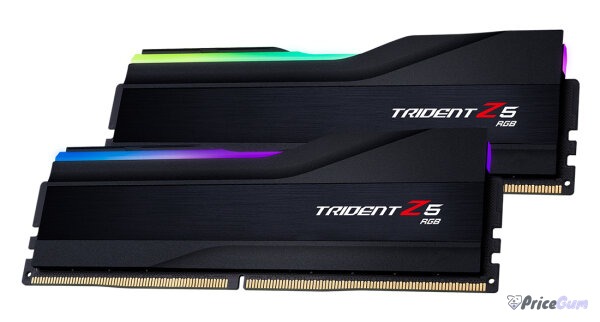
64GB DDR5 RAM Price List in Pakistan
| Kit | Speed | Timings | Seller | Price |
| TEAMGROUP T-Force Delta RGB 64GB (2x32GB) | 6000MHz | CL38 | CZone | Rs. 58,000 |
| G.Skill Trident Z5 RGB 64GB (2x32GB), White | 6000MT/s | CL36 | CZone | Rs. 59,000 |
| G.Skill Trident Z5 Neo RGB 64GB (2x32GB) | 6000MT/s | CL36 | CZone | Rs. 59,500 |
| Corsair Vengeance RGB 64GB (2x32GB), White | 5600MT/s | CL40 | JunaidTech | Rs. 61,999 |
| G.Skill Ripjaws S5 64GB (2x32GB) | 6000MT/s | CL30 | JunaidTech | Rs. 62,499 |
| Kingston Fury Beast 64GB (2x32GB) | 6000MT/s | CL30 | RB Tech and Games | Rs. 64,999 |
| G.Skill Trident Z5 RGB 64GB (2x32GB), Black | 6000MT/s | CL30 | CZone | Rs. 72,000 |
The sweet spot for most buyers is the Rs. 59,000 to Rs. 63,000 range. A G.Skill Trident Z5 RGB 64GB 6000 CL36 kit at Rs. 59,000 or the Ripjaws S5 6000 CL30 at Rs. 62,499 gives you a strong balance of speed and latency for the money. The CL30 kits cost a few thousand more than their CL36 siblings, and that premium buys tighter timings that show up in benchmarks and heavy workloads.
Who Actually Needs 64GB of DDR5
For pure gaming, 64GB is overkill. Modern games still run comfortably on 32GB, and you will not see higher frame rates by doubling it. The people who genuinely benefit from 64GB are doing work that eats memory for breakfast.
Video editors and 3D artists are the biggest group. Editing 4K footage in Premiere Pro or DaVinci Resolve, working with large After Effects compositions, or rendering in Blender can easily push past 32GB. If your timeline stutters or your software keeps caching to disk, 64GB smooths it out. Pair the RAM with a fast NVMe drive for your scratch disk, something like the Samsung 980 1TB, and you remove the two most common bottlenecks in an editing rig.
Developers running virtual machines and containers are next. A couple of Docker environments, a local Kubernetes cluster, or two VMs running side by side can each swallow 8 to 16GB. Add a heavy IDE and a browser full of tabs and 32GB starts feeling cramped. If you compile large codebases or run local AI models, 64GB gives you real headroom. This pairs well with an AMD Ryzen 7 7800X3D or Ryzen 5 7600 build, where DDR5 is mandatory anyway.
AI and machine learning hobbyists also belong here. Running local LLMs, Stable Diffusion, or dataset preprocessing on the CPU side benefits from big memory pools. It will not replace VRAM on your GPU, but 64GB of system RAM lets you load larger models into memory and keeps preprocessing from choking.
If none of that describes you, save your money. A 32GB DDR5 kit at half the price will feel identical in daily use and gaming.
DDR5 Speed and Timings Explained Simply
DDR5 speed is measured in MT/s (megatransfers per second), often written as MHz. The kits in the table above run at 5600 or 6000 MT/s, which is the current mainstream for DDR5. The base JEDEC speed of DDR5 is 4800MT/s, so every kit listed here is already running above stock thanks to a factory overclock profile.
The CL number is the CAS latency, basically how many clock cycles the RAM waits before responding. Lower is better, but it only means something together with the speed. A 6000 CL30 kit responds faster in real terms than a 5600 CL40 kit, which is why the Kingston Fury Beast and G.Skill Ripjaws S5 6000 CL30 kits command a premium. A 6000 CL36 kit sits in the middle and is honestly fine for almost everyone; the difference between CL30 and CL36 in everyday work is small.
One thing to avoid: mixing speeds. DDR5 kits of different speeds or timings in the same board will run at the speed of the slowest stick, and mismatched kits sometimes fail to train at all. Buy one matched 2x32GB kit and leave the other two slots empty unless you plan to add an identical kit later.
Compatibility: Motherboard QVL, EXPO and XMP
64GB DDR5 kits need a DDR5 motherboard, which means an Intel 12th gen or newer platform, or AMD AM5. If you are building on AM5, the MSI B650 Tomahawk WiFi is a popular board in this price class and handles 6000MT/s kits well.
Before buying, check your motherboard’s QVL (Qualified Vendor List). It is the manufacturer’s tested list of RAM kits, and a 64GB kit is exactly the kind of high-density memory where QVL validation matters. Kits not on the list usually still work, but at 2x32GB densities you do not want to gamble.
On the profile side, Intel boards use XMP 3.0 and AMD boards use EXPO. Most modern kits, including the G.Skill Trident Z5 Neo and Kingston Fury Beast, carry both profiles, so one kit works on either platform. Enable the profile in BIOS after installing, because without it your expensive 6000MT/s kit will boot at the 4800MT/s JEDEC default and you will be leaving performance on the table.
Buying a 64GB DDR5 Kit in Pakistan: Practical Tips
Stock is the main problem with 64GB kits locally. As of this writing, CZone, JunaidTech, and RB Tech and Games all show their 64GB listings as out of stock, which is normal for this niche; shops restock in waves. Both CZone and JunaidTech ask buyers to reconfirm price and availability on WhatsApp before payment, and you should take them up on it. Prices move with the dollar, and the listed rate can be a few thousand off by the time you order.
Check the warranty terms too. CZone offers up to 3 years on the TEAMGROUP kit and 1 year on G.Skill, while JunaidTech offers 2 years local warranty on the Ripjaws S5 and 1 year on the Corsair kit. Keep the box and invoice; RAM warranty claims in Pakistan almost always need proof of purchase from the original seller.
- Massive headroom for 4K video editing, 3D rendering, VMs, and local AI workloads
- 2x32GB kits keep two DIMM slots free for a future upgrade to 128GB
- Factory-matched pairs are binned and tested to run at rated XMP/EXPO speeds
- 6000MT/s CL30 kits are now priced close to slower CL36 options, so the premium is small
- Overkill for gaming and office work, where 32GB performs identically for much less money
- Very thin local stock in Pakistan; most sellers list 64GB kits as out of stock
- Higher-density kits are pickier about motherboard QVL and BIOS versions
- CL30 kits cost noticeably more than CL36/CL38 kits with little real-world difference for most users
FAQs
What is the lowest 64GB DDR5 RAM price in Pakistan?
The cheapest verified listing is the TEAMGROUP T-Force Delta RGB 64GB (2x32GB) 6000MHz CL38 kit at Rs. 58,000 on CZone. G.Skill Trident Z5 RGB 6000 CL36 kits at Rs. 59,000 to Rs. 59,500 are close behind.
Is 64GB DDR5 worth it for gaming?
No. Current games do not use anywhere near 64GB, and you will see no frame rate gain over 32GB. Spend the difference on a better GPU instead. 64GB only makes sense for video editing, 3D work, virtual machines, and AI workloads.
Can I use two 32GB DDR5 sticks bought separately instead of a kit?
It often works, but it is not recommended. A factory-matched 2x32GB kit is tested to run both sticks at the rated XMP or EXPO speed. Two separately bought sticks, even of the same model, can have different memory chips and may fail to boot at the advertised profile.
Do I need to enable XMP or EXPO for a 64GB DDR5 kit?
Yes. Without enabling the profile in BIOS, any DDR5 kit boots at the 4800MT/s JEDEC default. Turn on XMP 3.0 on Intel boards or EXPO on AMD boards to get the rated 5600 or 6000MT/s speed you paid for.
Why are most 64GB DDR5 kits out of stock in Pakistan?
64GB kits are a niche product with low turnover, so local shops stock them in small quantities and sell out between restocks. Prices also track the dollar closely. Message the seller on WhatsApp to confirm both the current price and the restock timeline before ordering.


Add comment