
 Muhammad Naeem
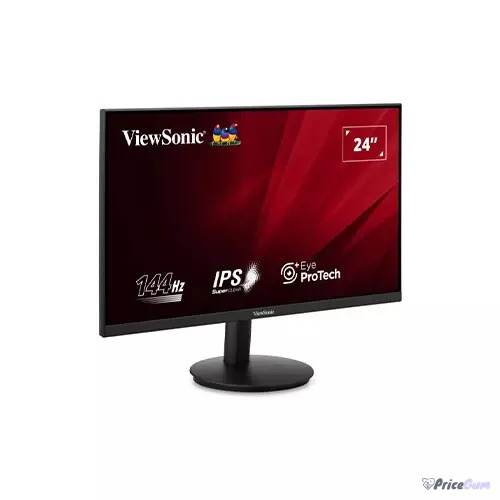
Finding the best gaming monitor under Rs. 30,000 in Pakistan means accepting one honest fact first: in October 2026, only one genuinely new 144Hz gaming monitor sits under that line with local warranty, the ViewSonic VA24G1-H at Rs. 29,500 from Mustafa Computers. Everything else either crosses the budget slightly, sells without the same warranty comfort, or has left the market. So this guide does two things. It names the true under-30,000 pick, and it shows the nearest step-ups, because stretching by Rs. 950 to Rs. 4,490 is how most buyers in this bracket actually end up happy.
Best Gaming Monitor Under Rs. 30,000: The Picks
| Monitor | Panel / Refresh | Seller | Warranty / Notes | Price |
| ViewSonic VA24G1-H | 24-inch IPS, 144Hz | Mustafa Computers | 1-year ViewSonic direct local warranty; the only true sub-30k new option | Rs. 29,500 |
| ViewSonic VA24G1-H | 24-inch IPS, 144Hz | iShopping.pk | Official warranty; Rs. 950 over the line | Rs. 30,450 |
| ViewSonic VA24G1-H | 24-inch IPS, 144Hz | EEZEPC | Authorised dealer; best returns route of the three | Rs. 33,990 |
Yes, all three rows are the same monitor. That is not laziness, it is the market. Below Rs. 30,000 new in Pakistan right now, the choice is which seller’s warranty and service you trust on the one monitor that qualifies. The next models up, such as the AOC 24G2SP at Rs. 48,390, the MSI G244F around Rs. 56,900, and the Gigabyte G24F 2 near Rs. 58,990, belong to a different budget conversation, and several of them were out of stock during our check anyway.
Why the ViewSonic VA24G1-H Wins This Budget
ViewSonic’s official specification is exactly what a budget gaming monitor should be in 2026:
| Model | ViewSonic VA24G1-H |
| Size | 24-inch (23.8-inch viewable) |
| Panel | IPS, 1920 x 1080 Full HD |
| Refresh rate | 144Hz |
| Response time | 1ms MPRT (4ms GTG) |
| Brightness | 400 cd/m2 |
| Contrast | 1,500:1 static |
| Colour | 114% sRGB, 80% NTSC coverage |
| Inputs | HDMI 1.4 x1, VGA x1 |
| Mount | VESA 100 x 100, tilt -5 to 20 degrees |
| Extras | Variable refresh, flicker-free, hardware low blue light |
An IPS panel at 144Hz with 400 nits of brightness is the correct checklist for under-Rs. 30,000 gaming: fast enough for Valorant and CS2, bright enough for a lit room, and colour coverage good enough that the same screen can edit photos without embarrassing you. If you are still learning how refresh rates map to prices, our 144Hz gaming monitor price guide shows the full ladder, and the 165Hz monitor guide explains what the next step buys.
What You Give Up Under Rs. 30,000
Be clear-eyed about the compromises. You get one HDMI port and a VGA port that belongs to another decade, so a PC plus console setup means cable swapping. There is no height adjustment, only tilt. The 1ms figure is MPRT, with 4ms grey-to-grey underneath, which is normal at this price but worth knowing. And premium features like HDR that means anything, USB-C video input, and built-in speakers worth using simply do not exist in this bracket.
If those limits sting, the honest move is not a different under-30k monitor, because there is not one. The move is the best gaming monitors under Rs. 50,000 bracket, where models like the Samsung Odyssey G3 class of screens add better stands, more ports, and higher refresh rates.
The Used Route: Where Under-30k Gets Interesting
The second way under this budget is the used market, where 144Hz monitors from AOC, MSI, and Samsung change hands well below Rs. 30,000. The risk is panel faults that photos will never show: backlight bleed, dead pixels, flicker that appears only at certain brightness levels. Test any used panel in person at full white, full black, and your actual games before money moves. Our used monitor buying checklist walks through the full test routine, including how to check refresh rate honesty in Windows.
Who Should Buy What
Buy the VA24G1-H from Mustafa Computers at Rs. 29,500 if your budget is hard-capped and you want a warranty with your 144Hz. Take the iShopping listing at Rs. 30,450 if official warranty paperwork matters more than the Rs. 950 difference. Stretch to EEZEPC at Rs. 33,990 if you value an authorised dealer’s returns route. And if your real budget is quietly Rs. 40,000 to Rs. 50,000, skip this whole bracket and buy once, properly, from the under-50,000 guide.
Verdict
The best gaming monitor under Rs. 30,000 in Pakistan is the ViewSonic VA24G1-H, and the only real decision is which seller you buy it from. It is a narrow crown, but it is an honest one: 144Hz IPS with local warranty at Rs. 29,500 is a good deal in 2026.
- True 144Hz IPS gaming under Rs. 30,000 with local warranty
- 400-nit brightness and 114% sRGB suit gaming and light editing
- Three seller routes let you trade price against warranty comfort
- VESA mount and variable refresh at a budget price
- Only one model genuinely qualifies new; choice is seller, not screen
- Single HDMI port and a tilt-only stand
- Stepping to better-known gaming lines costs Rs. 48,000 and up
- Several rivals were out of stock during the October check
FAQs
What is the best gaming monitor under Rs. 30,000 in Pakistan?
The ViewSonic VA24G1-H, listed at Rs. 29,500 by Mustafa Computers with a 1-year ViewSonic direct local warranty. In our October 2026 check it was the only new 144Hz IPS gaming monitor genuinely under Rs. 30,000.
Can I get a 144Hz monitor under Rs. 30,000?
Yes, the VA24G1-H does 144Hz at 1080p. Beyond it, new 144Hz models jump to roughly Rs. 48,000 and above, so the under-30k 144Hz market is this one monitor plus the used route.
Is it worth stretching above Rs. 30,000?
Often, yes. Rs. 30,450 at iShopping adds official warranty, and the under-Rs. 50,000 bracket adds height-adjustable stands, more ports, and higher refresh rates. Stretch only if the budget exists; do not borrow for a monitor.
Should I buy a used gaming monitor instead?
If you can test it in person, a used 144Hz monitor under Rs. 30,000 can be excellent value. Check for dead pixels, backlight bleed, and flicker at your real brightness, and confirm the refresh rate in Windows display settings.
Which port should I use for 144Hz?
Use the HDMI input with the cable supplied and set 144Hz in Windows advanced display settings. The VGA port cannot deliver the full refresh rate and should only be a fallback for older machines.
Full specifications are on the official ViewSonic VA24G1-H product page.
Prices checked October 1, 2026 from the sellers listed above. Monitor stock in Pakistan changes quickly at this price, so confirm availability and warranty terms before paying.



Add comment